If you’ve recently purchased a KitchenAid food chopper, you may wonder, how do you open the KitchenAid food chopper without damaging the lid or locking mechanism. The good news is that KitchenAid choppers are designed with a simple safety-lock system that’s easy to use once you understand how it works.
In this guide, you’ll learn the correct way to unlock and open your food chopper, along with tips for troubleshooting a stuck lid and keeping your appliance in excellent condition.Why KitchenAid Food Choppers Have a Locking Lid
KitchenAid food choppers feature a safety locking system that prevents the motor from operating unless the bowl and lid are correctly secured. This helps prevent spills and reduces the risk of accidents.
Because of this design, the lid may feel tight if you’re unfamiliar with the locking mechanism. 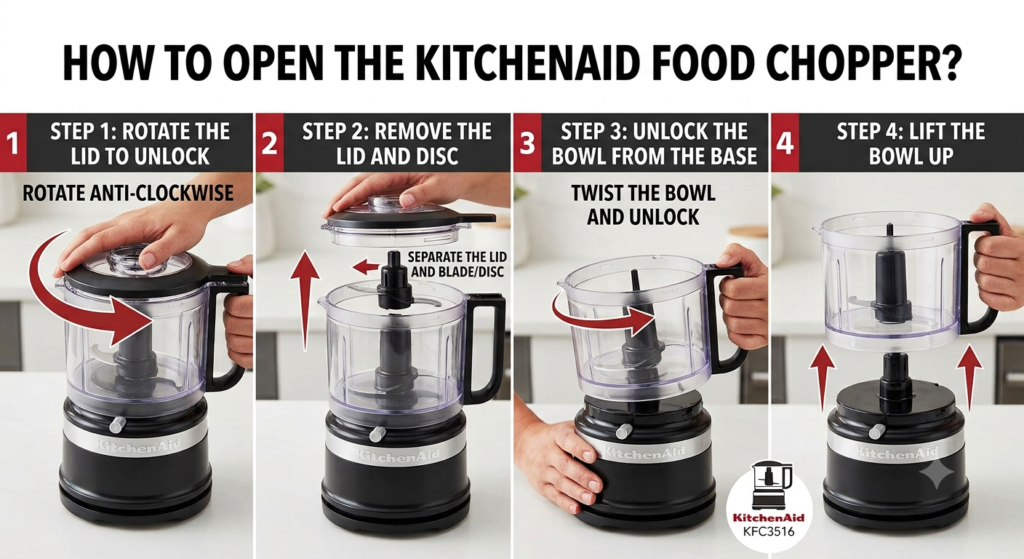
How Do You Open the KitchenAid Food Chopper?
Follow these simple steps:
Step 1: Turn Off and Unplug the Appliance
Always disconnect the food chopper before opening it. Safety should always come first. Unplugging the appliance prevents accidental operation while you’re handling the lid or blade. It also helps protect both you and the appliance from unnecessary damage.
Step 2: Hold the Bowl Firmly
Place one hand on the bowl to prevent it from moving while you unlock the lid. A steady grip makes it easier to release the locking mechanism without slipping. Keeping the bowl stable also reduces the risk of spilling any ingredients inside.
Step 3: Rotate the Lid
Most KitchenAid food choppers open by turning the lid counterclockwise until it unlocks. Rotate the lid slowly until you feel or hear the locking mechanism release. Avoid forcing the lid, as applying too much pressure could damage the locking tabs or make opening more difficult.
Step 4: Lift the Lid Straight Up
Once unlocked, gently lift the lid upward without tilting it. If you feel resistance, check that the lid has fully rotated to the unlock position before trying again. Pulling too hard may damage the lid or spill the contents inside the bowl.
Step 5: Remove the Blade Carefully
The stainless-steel blade is extremely sharp, so handle it with extra care. Always remove it by holding the plastic center hub instead of touching the cutting edges. Place the blade on a flat surface immediately after removal to avoid accidental cuts.
What If the Lid Won’t Open?
Sometimes users find the lid difficult to remove.
Try these solutions:
- Ensure the appliance is unplugged.
- Rotate the lid completely to the unlock position.
- Hold the bowl securely while twisting.
- Remove any food trapped around the seal.
- Wait a minute if pressure has built up inside.
Never use excessive force.
Common Reasons the Lid Gets Stuck
A food chopper lid may become difficult to open because of:
- Food debris around the locking tabs
- Overfilled processing bowl
- Incorrect lid alignment
- Vacuum pressure after processing liquids
- Worn or damaged locking parts
Cleaning the appliance regularly helps prevent these problems.
How to Clean the Food Chopper After Opening
Proper cleaning extends the life of your appliance.
Follow these steps:
- Remove the blade carefully.
- Wash the bowl and lid with warm, soapy water.
- Wipe the motor base with a damp cloth.
- Dry all parts completely.
- Reassemble only after everything is dry.
Always consult your owner’s manual for dishwasher-safe components.
Common Mistakes to Avoid
Many first-time users accidentally damage the locking mechanism.
Avoid these mistakes:
- Pulling the lid straight upward before unlocking
- Using metal tools to pry open the lid
- Forcing the lock
- Running the chopper with an improperly installed lid
- Ignoring food buildup inside the locking grooves
Tips for Easier Opening Every Time
You can make opening your KitchenAid food chopper easier by:
- Cleaning the locking grooves after every use
- Avoiding overfilling the bowl
- Properly aligning the lid before locking
- Drying the locking tabs after washing
- Following the manufacturer’s instructions
- All Posts
- Buying Guides
- Commercial Kitchen
- Kitchen Equipment
- Product Reviews
- Tips & Maintenance